
Voice Typing
Snippets
Snippets are voice shortcuts that automatically replace specific spoken phrases with predefined text. Think of them as "voice macros" that save you from typing out long email addresses, complex terms, or repetitive sentences.
Snippets are not applied if your text style is set to "No styling". Learn more about text styles here.
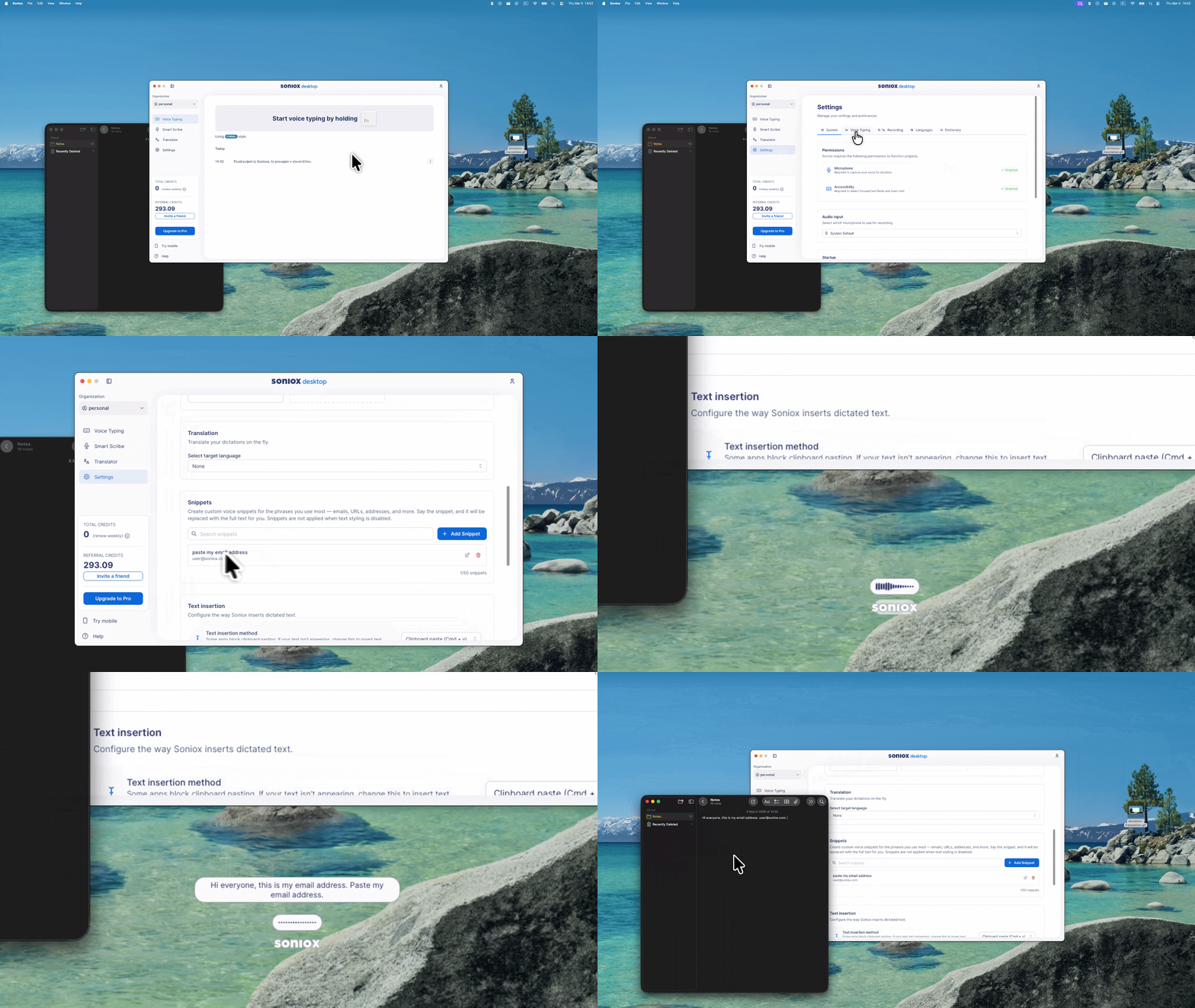
How to Use Snippets
To create your first shortcut:
- Open Settings.
- Navigate to the Voice Typing section.
- Select Snippets to add a new entry.
Pro-Tips for Success
- Be Distinct: Choose a "trigger phrase" that you don't use in normal conversation. This prevents the app from accidentally replacing text when you don't want it to.
- Be Purposeful: Use clear, command-like language.
Example:
If you set the trigger to "paste my email address", the app will automatically type user@soniox.com whenever you say those words.
Common Use Cases
| Trigger Phrase | Resulting Text |
|---|---|
| "Insert home address" | 123 Maple Avenue, Springfield, IL |
| "My meeting link" | https://meet.example.com/user-room |
| "Standard signature" | Best regards, [Your Name] |
| "Paste my email address" | user@soniox.com |